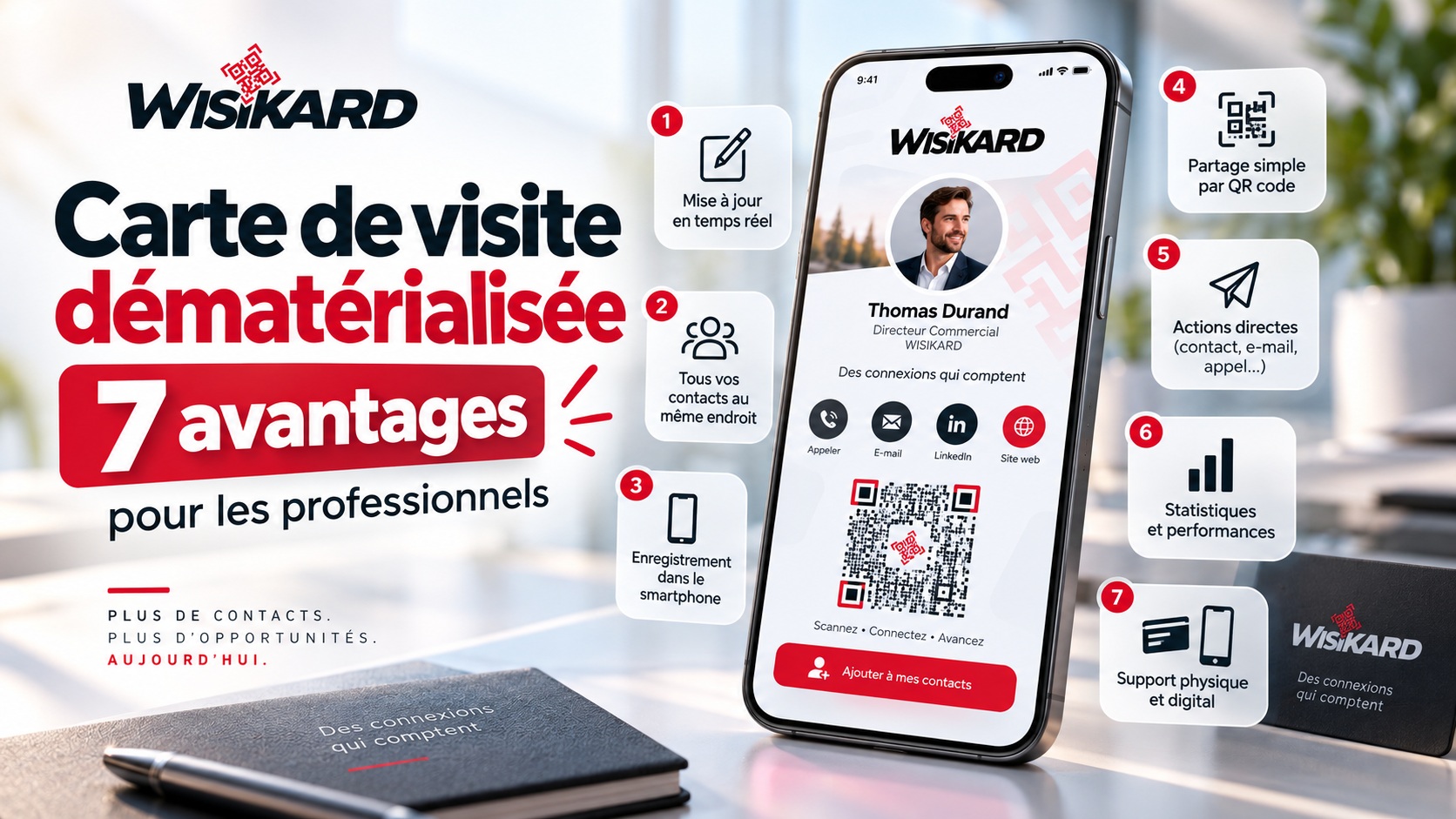
Digital business cards are attracting more and more professionals who want to modernize the way they share their contact information.
Accessible from a QR code, a web link, or an NFC chipIt allows you to centralize all of a professional’s useful information on a single page, accessible from a smartphone.
But beyond their modern appeal, what are the real benefits of a digital business card?
Here are 7 Concrete Reasons These features make it a particularly valuable communication tool in 2026.
What Is a Digital Business Card?
A digital business card is a digital version of the traditional business card.
They allow you to present and share your professional information without relying solely on paper.
In particular, it can include:
- name and job title;
- phone number;
- email address;
- the website;
- social media;
- Hours;
- a route;
- photos and videos;
- PDF documents;
- booking links;
- payment methods;
- online forms or services.
All of this is compiled on a single page, easily accessible from a smartphone.
1. Update your information without having to reprint your cards
This is one of the main benefits of a digital business card.
With a paper business card, every change can render the old cards unusable:
- new phone number;
- new email address;
- new website;
- new feature;
- new address;
- New hours.
With a solution like Wisikard...this information can be edited directly from a dashboard.
The QR code remains the same, even when the information on the card changes.
This means you can continue to use the same materials you’ve already printed.
2. Consolidate all your information on a single page
A traditional business card has limited space.
It typically includes:
- a name;
- a phone;
- an email address;
- a website.
A digital business card lets you go much further.
It can become a true mini-professional space Bringing together contact information, social media profiles, documents, services, and the main ways to get in touch.
Prospects no longer need to search for different pieces of information across multiple platforms.
3. Make it easier to save contact information
Manually copying a phone number or email address isn’t particularly convenient.
A digital business card can help a prospect to save contact information directly to your smartphone.
In just a few seconds, they can add:
- the professional’s name;
- their business;
- their phone number;
- their email address;
- its website.
This simplicity reduces the risk of the card being forgotten or lost after a meeting.
4. Share Your Card Anywhere with a QR Code
Digital business cards aren’t limited to face-to-face meetings.
Its QR code can be used on a variety of professional materials:
- business card;
- flyer;
- poster;
- showcase;
- company vehicle;
- quote;
- invoice;
- email signature;
- trade show badge;
- counter display;
- restaurant table.
The QR code thus becomes a A single point of access to all of a professional’s communications.
5. Directly Guide Prospects to a Call to Action
A traditional business card conveys information.
A digital business card can also enable prospects to take immediate action.
| Objective | Available Actions |
|---|---|
| Contact the professional | Call or email |
| Schedule an appointment | Access the booking calendar |
| Explore a Business | Visit the website |
| Visit the site | Start the itinerary |
| Buy or Order | Link to a store or ordering service |
| Pay | Access to a payment page |
The business card then becomes a true A tool for conversion and building connections.
6. Track your business card’s usage
With a paper business card, there’s no way to know if it was viewed after being given to a prospect.
With a digital business card, you can track statistics on how it’s being used.
Depending on the solution used, you can track:
- the number of views;
- clicks on contact information;
- interactions with links;
- Trends in page views over time.
This information provides a better understanding of the effectiveness of various communication tools.
7. Combining Digital Technology with a Physical Format
Using a digital business card doesn’t necessarily mean giving up all physical business cards.
On the contrary, the two can work perfectly well together.
With Wisikard, the QR code can be integrated onto various physical media:
- Wooden Kard;
- Kard made of PLA;
- Aluminum Kard;
- counter display;
- table stand;
- business card.
Physical cards grab attention, while digital cards let you present all the information.
The physical card makes the first connection. The digital version extends the interaction.
Paper or Digital Business Cards: Do You Really Have to Choose?
The two formats aren’t necessarily mutually exclusive.
A physical business card can easily contain just a few essential pieces of information along with a QR code.
For example:
- name;
- company;
- function;
- logo;
- QR Code.
The prospect then scans this QR code to view the rest of the information.
This approach allows you to retain an elegant physical format while enjoying the flexibility of digital technology.
Which professionals can use a digital business card?
Digital business cards can be adapted to a wide range of professions.
Tradespeople
A tradesperson can showcase their contact information, portfolio, website, and reviews, and invite clients to request a quote.
Sales Representatives
They can quickly share their professional profile during a meeting or at a trade show.
Retailers
The card can centralize business hours, directions, social media, and various business services.
Restaurant Owners
The same card can provide access to menus, hours, reservations, and delivery platforms.
Freelancers and Consultants
They can consolidate their contact information, services, portfolio, and appointment scheduling tools.
Businesses
A company can create multiple cards for its employees while maintaining a consistent visual identity.
Wisikard: A Digital Business Card Designed for Professionals
Wisikard Allows you to create a professional card accessible via a unique QR code.
In particular, it allows you to centralize:
- your contact information;
- your schedule;
- your website;
- your social media accounts;
- your photos and videos;
- your documents;
- Your personalized links;
- your booking tools;
- your payment methods;
- Your itinerary.
You can then edit this information from your dashboard without replacing the QR code already in use on your materials.
Wisikard also offers several design templates, detailed statistics, and personalized physical Kards.
Conclusion: Why Switch to Digital Business Cards?
Digital business cards do more than just replace paper ones.
They turn a simple exchange of contact information into a much more comprehensive experience.
Its main benefits are simple:
- Information that’s always up to date;
- More content available;
- Simplified contact information entry;
- A QR code that works on all devices;
- directly accessible actions;
- statistics to track usage;
- the ability to combine digital and physical formats.
For professionals looking to modernize their communication, the Digital business cards are thus becoming an essential everyday tool.
Discover Wisikard and create your digital business card:
https://wisikard.fr/#offre
FAQ – Digital Business Cards
What Is a Digital Business Card?
A digital business card is a digital page containing the contact information and professional details of an individual or a company. It can be shared via QR code, link, or NFC.
Does a digital business card require an app?
No. With a web-based solution like Wisikard, prospects can view the card directly from their smartphone’s browser.
Can you edit a digital business card?
Yes. The information can be updated at any time without having to replace the QR code that has already been printed.
Can you add a digital business card to a phone?
Yes. A digital business card allows prospects to save your professional contact information directly to their address book.
Where can you use the QR code from a digital business card?
It can be used on a business card, a flyer, a storefront, a vehicle, a quote, an email signature, or even a physical display placed on a counter or table.