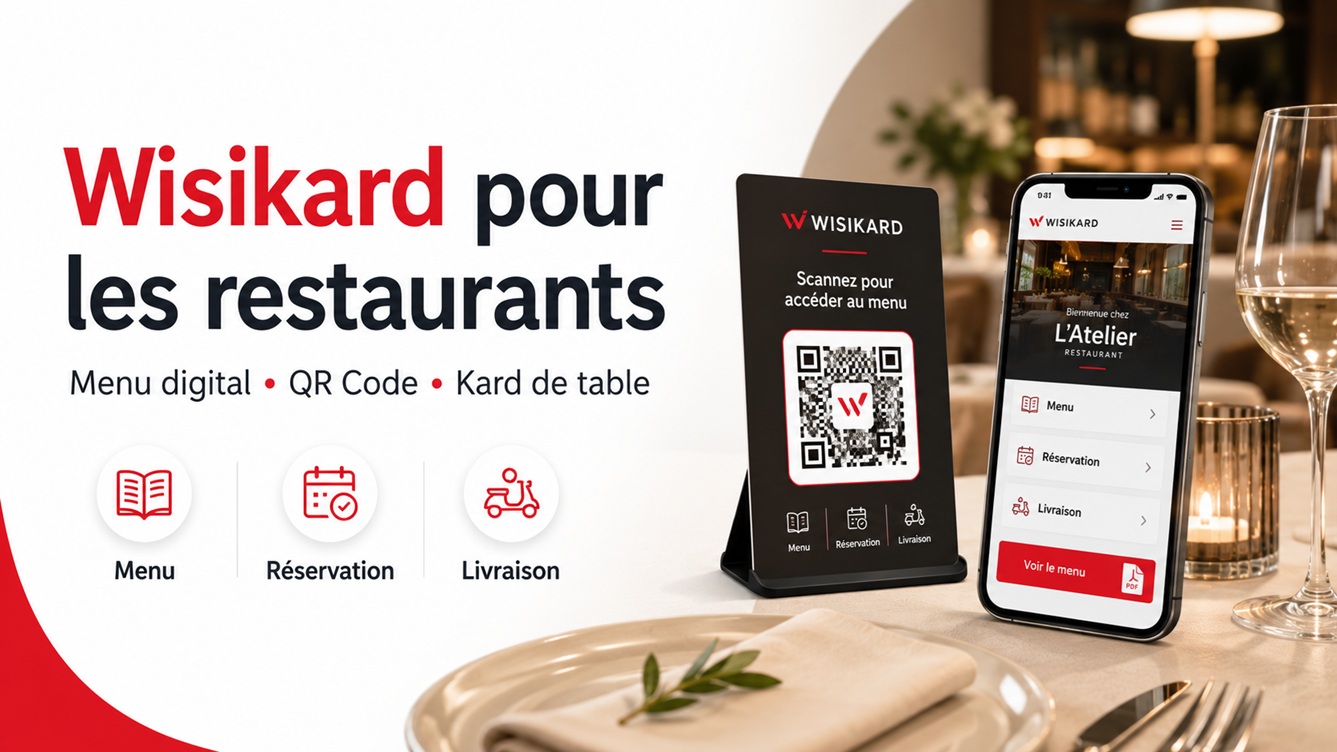
Reprinting menus or replacing QR codes every time a change is made can quickly become a hassle. With Wisikard, restaurant owners have a single point of access—accessible via a QR code—to centralize their menu and all their useful information.
Establishments such as 38 Boulevard, L’Athéna, L’Île aux Sandwichs, Casa Pizzas or even La Piccola Italia are already using Wisikard as a powerful communication tool for their restaurants. app.wisikard.fr
A single QR code to showcase your restaurant
The concept is simple: each restaurant has its own Wisikard, accessible via a personalized URL and a unique QR code.
This QR code can be displayed:
- on the tables;
- at the restaurant entrance;
- on paper menus;
- on flyers;
- on takeout packaging;
- on the storefront;
- on a physical Kard made of wood, PVC, metal, or 3D-printed material.
Customers scan the QR code with their phone and immediately access the restaurant’s information, without needing to install an app.
Depending on the configuration you choose, Wisikard can bring together the menu, hours, phone number, directions, social media, customer reviews, website, and even ordering and delivery services. Examples from L’Île aux Sandwichs, Casa Pizzas, La Piccola Italia, and L’Athéna notably demonstrate the integration of menus, contact information, hours, maps, and external platforms. app.wisikard.fr
Easily display your menu in PDF format
The easiest way is to prepare your menu as a PDF document and then upload it to your Wisikard.
All the customer has to do is scan the QR code on the table to view the menu on their smartphone.
This solution is particularly well-suited for restaurants whose menus remain relatively stable. It makes it easy to replace an old file with a new version without having to change the QR code that’s already been printed.
So you can continue to use the same QR code on your materials, even if you make changes:
- dishes;
- set menus;
- prices;
- drinks;
- desserts;
- opening hours;
- reservation information.
The QR code remains the same. Only the content of the Wisikard is updated.
Update your daily menu with Canva
For establishments whose menus change daily, Wisikard can also be integrated with a tool like Canva.
This is notably the choice made by 38 BoulevardThe restaurant uses several Canva documents, accessible via custom links embedded in its Wisikard: daily specials, wine list, beverages, pizzas, ice cream, cocktails, and side dishes. app.wisikard.fr
It’s very convenient to use:
- The restaurant creates its menu in Canva;
- He adds the public link to the document in Wisikard;
- The customer scans the QR code;
- The customer selects the menu they wish to view;
- The restaurant owner can then edit their Canva document whenever they want.
Updates to the document are automatically visible via the same link. This means there’s no need to replace the file, change the QR code, or reprint the materials on the tables.
This structure also allows for a clear separation of the different types of content:
- daily specials;
- permanent menu;
- wine list;
- drinks;
- desserts;
- cocktails;
- seasonal specials;
- group menus;
- special set menus.
A physical Kard right on the tables
To make the experience more visible and professional, a QR code can be integrated into a Physical menu customized.
Placed on each table, this Kard becomes a valuable communication tool for the restaurant. It can be customized with the restaurant’s logo, colors, and brand identity.
It allows customers to immediately find the menu and eliminates the need for simple QR code stickers, which can sometimes look unattractive or wear out quickly.
The physical Kard can also be used:
- on the counter;
- at the register;
- in the guest rooms of a hotel-restaurant;
- on a patio;
- at a takeout location;
- during an event or catering service.
Wisikard offers customizable physical “Kards” and features stands made of wood, PVC, or steel, paired with the digital menu. Wisikard
Make life easier for your customers
A Wisikard isn’t just for displaying a menu.
It can also consolidate all useful features into a single interface:
- call the restaurant;
- Check the hours;
- Open directions;
- save contact information;
- Explore the menu;
- Visit the website;
- order online;
- Reserve a table;
- check Facebook or Instagram;
- Leave a Google review;
- Access a delivery platform.
For example, L’Île aux Sandwichs uses its Kard to showcase its business, menu, website, directions, and a link to Uber Eats. L’Athéna highlights its phone number, directions, reviews, and social media accounts. app.wisikard.fr
Instead of sharing several different links, the restaurant shares a single Wisikard.
Reduce unnecessary printing and revisions
Paper menus remain useful in many establishments, but they also entail costs for design, printing, and replacement.
A mistake, a price change, or a dish being removed can force you to reprint the entire menu.
With Wisikard, key information can be updated online at any time while keeping the same QR code. The service is designed to centralize links, contact information, and content, featuring a customizable menu and updates without the need to reprint the QR code. Wisikard
This saves time and helps minimize:
- reprints;
- outdated menus;
- conflicting information;
- QR codes that vary depending on the device;
- menus that are worn out or difficult to clean.
A solution tailored to different types of restaurants
Wisikard is suitable for many types of establishments:
- traditional restaurants;
- pizzerias;
- snacks;
- sandwich shops;
- food trucks;
- bars;
- tea rooms;
- caterers;
- hotel-restaurants;
- restaurants with delivery;
- establishments offering a daily special.
Each restaurant can use its Kard differently, depending on how it operates.
A pizzeria can display its menu and order number. A traditional restaurant can separate the daily specials, wine list, and dessert menu. A snack bar can highlight its hours, directions, and delivery platform.
Check out examples of Wisikard for restaurants
Several establishments are already using Wisikard:
Their configurations show that a Wisikard can serve just as well as a digital menu as it can as a contact page, a booking tool, or a central hub for the restaurant’s services. app.wisikard.fr
Turn your Wisikard into a powerful tool for your restaurant
Just like Le 38 Boulevard, L’Athéna, L’Île aux Sandwichs, Casa Pizzas, or La Piccola Italia, you can use Wisikard to simplify menu management and improve access to information about your restaurant.
A single QR code is all you need to display your menu, contact information, hours, social media, reservation services, and ordering links.
You keep the same QR code while remaining free to update your content at any time.
Discover Wisikard’s offerings and create your own Kard for your restaurant: Check out the Wisikard offering.